NinjaGames Box Character Controller: Modular 2.5D Plataformer - Online Documentation
Overview
It's a character control and movement system geared toward 2D or 2.5D platformer-style games, with its own custom collision system that prioritizes smooth and precise movement. The controller uses the classic box shape instead of the capsule shape, like old NES-era games, for example, making it ideal for precise platforming. The system's idea is to simulate classic game behaviors, such as precise edge collisions and fast, responsive movement. The system is heavily based in Mega Man and Metroid games.
Unity's default Character Controller uses a capsule shape. This isn't ideal when you want to create precise platforming, because if you move to the edge of a platform, you'll encounter problems like: The controller will start to sink. Floor detection can become somewhat inaccurate. Depending on how you program the movement, you may lose momentum.
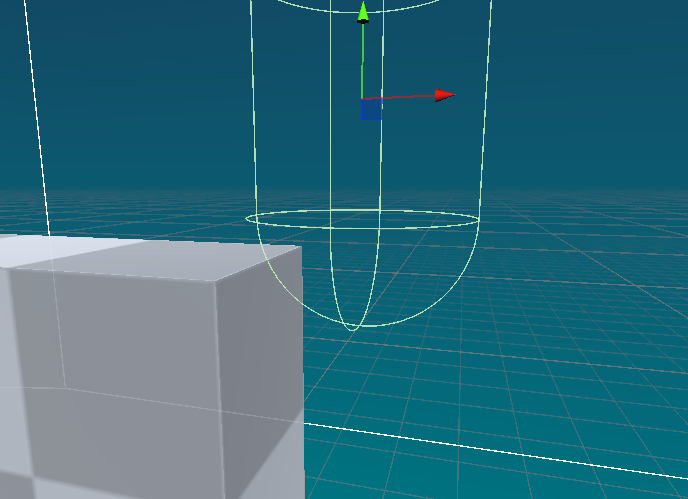
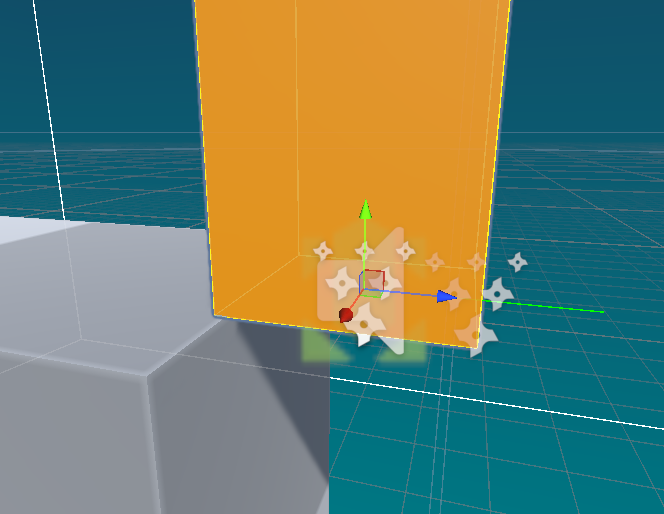
NG BCC uses the same methods from classic consoles games, by using a box to compute the collisions, which makes it perfect for precise platforming and side scroller games. The controller is kinematic, with means it is not affected by the Unity Physics system. The collision system was made from scratch.
Although the implementation is simple, some best practices should be followed to maximize the quality of the movement and collision system. Just like in older games, the system was designed with a platforming approach in mind. It's crucial to build your levels and objects with tiles in mind so that movement and collision work seamlessly.
- Use box colliders for platforms and obstacles to ensure accurate collision detection.
- Avoid using sloped surfaces, as the box collider may not handle them well.
- Design your levels with clear edges and platforms to take full advantage of the precise collision system.
- Test your levels thoroughly to ensure smooth movement and collision behavior.
- Make sure your level colliders are uniform and do not have irregular intersections.
This system is designed for a very specific use case. If you want to add additional features, you'll have to implement them yourself. The asset was built with 2.5D sidescrollers with cubic tile-based levels and no slopes in mind. Be sure to play the demo before purchasing this asset.
Pros:
- Simpler than Unity' Character Controller.
- Use the same Unity' Character Controller syntax for the Move() method, but, you dont need to pass a Time.deltaTime.
- Smooth and precise movement and collision, ideal for platformers.
- Precise ground and celling detection.
- Helpful methods and events callbacks ready for use.
- You can accurately replicate classic game movement behaviours.
- Source code included. You can modify and extend the controller as needed.
Cons:
- Doesn't work well with slopes (for now).
- Made for 2D plane only (for now).
- Doesn't work well with smash level mesh bumps or colliders intersections (for now).
Because of the shakiness and inaccuracy in collisions. I decided to create a collision system from scratch, and it turned out much better.
Not yet, but it's on the roadmap. I've started implementing this feature, but it's still under development. We'll have it available in the future.
Not yet, but it's on the roadmap.
Not yet, but it's on the roadmap. I have to make some improvements to the collision system to make the system not limited to just 2D
Setup
To start using NG BCC, add the NG Box Character Controller component to your game object. If you want a ready-made movement system, also add the NG Platform Player Controller component to your game object. Inside the asset directory, in the Prefabs folder, you'll find a ready-to-use controller prefab. Simply drop it into your scene.
Core Scripts
For better debugging visualization of controller physics and
collisions, install the following package in your project:
RaycastVisualization. Then uncomment the following import in the
NGBoxCharacterController.cs and
NGPlataformerPlayerController.cs scripts: using Physics = Nomnom.RaycastVisualization.VisualPhysics;
NGBoxCharacterController It is the main script responsible for calculating collisions and performing movement based on the provided velocity vector.
-
Move(Vector3 velocity)– The main method used to move the controller is the same syntax as Unity's CharacterController. The only difference is that you don't need to pass your velocity vector multiplied by Time.deltaTime. Internally, the box controller already does this. You just need to pass your raw velocity vector. -
IsGrounded(): bool– Method used to check if the controller is touching the ground. It is the equivalent of Unity's CharacterController.isGrounded. -
IsTouchingCelling(): bool– Method used to check if the controller is touching the ceiling. -
isRightSideColliding(): bool– Method used to check if the right side of the controller is colliding with something. -
isLeftSideColliding(): bool– Method used to check if the left side of the controller is colliding with something. -
GetCurrentVelocity(): Vector3– Returns the controller's current velocity vector. -
GetControllerDimensions(): Vector3– returns the controller's current dimensions (witdh, height and lenght).
NGPlataformerPlayerController It's a script that simulates the movement of a character from high-quality platform games. It's highly customizable, with several parameters and behaviors to toggle, allowing you to customize your character the way you want. It utilizes and demonstrates the features of NG BCC.
-
Check_Y_Vel(Check_Y_Vel_Type type, bool
                      useMinusPlusEqual): bool
– Checks if the Y-axis of the player's velocity vector meets a given condition. -
Start_Dash_Coroutine(): IEnumerator– Coroutine that makes the player start a dash. -
End_Dash_Coroutine(): IEnumerator– Coroutine that makes the player end a dash. -
Stop_Dashing()– Makes the player stop dashing. -
Stop_Dashing_Only_Coroutines()– Makes the player stop dashing, but it only stop the coroutines related. -
DoingUpwardDash(): bool– Checks if the player is doing a upward dash. -
Jump(float jumpHeight, bool useDefinedHeight)– Makes the player do a jump. -
GetCurrentPlayerState(): ControllerState– Returns the players's current state. -
GetCurrentPlayerSubState(): ControllerSubState– Returns the players's current sub-state. -
GetCurrentPlayerDashState(): ControllerDashState– Returns the players's current dash state. -
AddExtraForce(Vector3 force, bool additive, bool
                      stopCurrentVelocity, bool useJumpMethodFor_Y_Vel, bool
                      useDefinedJumpHeight, bool stopDash)
– Apply extra forces on the player.
NG Plataformer Player Controller Events
The NGPlataformerPlayerController provides useful events when certain actions are executed. You can use them to add more logic, trigger visual and audio effects, and many other things.
-
OnJump()– Invoked when the player performs a jump. -
OnAirJump()– Invoked when the player performs a air jump. -
OnLand()– Invoked when the player lands on ground. -
OnStartDash()– Invoked when the player enters in the StartDash state. -
OnDash()– Invoked when the player enters in the Dash state. -
OnEndDash()– Invoked when the player enters in the EndDash state. -
OnStopDash()– Invoked when theStop_Dashing()method is called. -
OnWallJump()– Invoked when the player performs a wall jump. -
OnWallSlide()– Invoked when the player enters the WallSlide state. -
OnChangeDirection()– Invoked when the player change its facing direction.
NG Plataformer Player Controller Behaviours
NGPlataformerPlayerController enables various behaviors to customize your player's movement style. These are gameplay rules that you can combine to make your movement unique.
-
resetCurrentSpeedWhenStartDash– Reset the player current movement before starting a dash. -
stopDashWhenChangeDirection– Stop the dash if the player changes direction. -
doAirJumpOnlyWhenFalling– Allow air jump only when falling. -
enableJumpDash– Enable the jump dash action. -
limitGravityAcceleration– Limit the maximum gravity acceleration. -
enableWallSlide– Allow sliding on walls. -
enableWallJump– Allow wall jumps. -
enableGravityWhenAirDashing– Enable gravity during air dashes. -
enableAirJumpsAfterAirDashing– Allow air jumps after performing an air dash. -
enableAirDashesAfterAirJumping– Allow air dashes after performing an air jump. -
enableAirJumpsWhileJumpDashing– Allow air jumps while jump dashing. -
enableAirDashesWhileJumpDashing– Allow air dashes while jump dashing. -
preserveMomentumWhenAirJumpingAfterJumpDashing– Preserve momentum when air jumping after a jump dash. -
preserveMomentumAfterAirDashing– Preserve momentum after performing an air dash. -
enableAirJumpsAfterUpwardDashFromGround– Allow air jumps after an upward dash from the ground. -
enableAirDashesAfterUpwardDashFromGround– Allow air dashes after an upward dash from the ground. -
enableDashWhenNearWall– Enable dash even when near a wall. -
stopDashWhenNearWall– Stop dash when near a wall. -
enableChangeDirectionWhileDashing– Allow the player to change direction while dashing. -
enablePreciseJump– Enable precise jump input handling. -
enablePreciseDash– Enable precise dash input handling.
Boost Zone
These are triggers that the NG Plataformer Player Controller touches,
a force is applied through the AddExtraForce() method
that can be used to simulate boost/jump pads, wind, explosion, etc.
To create a boost zone, create an empty game object and add a
collider component to it. Set the collider as a trigger. Then,
add the
NGPPC_ExtraForceApplier.cs component to the game
object. Or, just drop the BoostZone prefab that is inside the
prefabs folder into your scene.
NGPPC_ExtraForceApplier It is a script that
calls the NGPPC AddExtraForce() method when it
enters on the trigger zone and adds an extra force based on
the provided settings.
-
playerTag: string– It is the property that defines which player controller tag will be affected by the zone.. -
forceVelocityVector: Vector3– The force vector that will be applied. -
multiplier: float– Force vector multiplier. -
useTransformDirection: bool– When checked, the force will be projected according to the forward transform of the boost zone. -
additiveMode: bool– When checked, force vector will be added to the current extra force vector of the player, increasing it. -
useJumpMethodFor_Y_Vel: bool– When checked, the player will perform a jump instead of change the extra force vector Y value. It is recommended to leave this checked. -
useDefinedJumpHeight: bool– When checked, if theuseJumpMethodFor_Y_Velis checked, the player will be launched to a certain height. -
stopCurrentPlayerVelocity: bool– When checked, the player current velocity will be reseted before adding an extra force. -
stopCurrentPlayerVelocity: bool– When checked, the player will stop dashing when enters the zone.